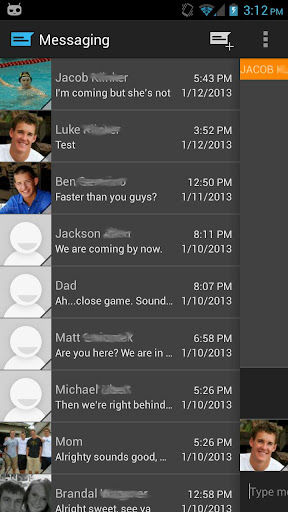
Description:Easily manage text messages in a new and up to date format compliant with the Android design guidelines and visually based on the stock messaging app from Google, with added features.
Features:Easily switch between conversations by dragging out the sliding menu on the left side of the screen.Start a new conversation by sliding out the menu on the right side of the screenManage old messages with a single clickChoose between light and dark themesLimited MMS supportEmoji supportAdjust text size and control notifications and theme though settingsQuick reply popupMulti-window support for Galaxy NoteLight Flow support
Pro Features:Currently limited MMS support (future improvement definitely coming though)Lots more coming in the future :)
Note:If you are having problems receiving notifications, you may need to uninstall 3rd party messengers such as Go SMS.When using this app, do not disable the stock messaging app as I use it to permanently save messages to the phone. You can however, disable notifications for it so that you don't receive 2 of them.
What's New:Quick fixes for force close some were experiencing, sorry about that!Added SlideOver, a replacement to the traditional popupAdded cards UI 2.0, a fully themeable, much faster and stabler cards based layoutAbility to search through messagesAdded Floating Notifications extensionOption to pin conversation list to the left side of the screen at all timesOption to show message counter on split SMS messagesMinor UI changesBug fixes
Required Android O/S: 4.0+
Screenshots:
Download: (4MB)
Description:Skype is software for calling other people on their computers or phones. Download Skype and start calling for free all over the world.The calls have excellent sound quality and are highly secure with end-to-end encryption. You don't even need to configure your firewall or router or any other networking gear.
Additionally it doesn't just work on Windows. Skype is also for Mac OS X, Linux and PDAs using Pocket PC, with a native look and feel for each platform. Talking, sending instant messages or even file transfers work between different platforms like a charm.
Features:- Skype calling - Skype has all the features of an ordinary phone so it's even easier to manage your calls.
- Video calling - see who you are talking to at the same time as speaking to them.
- Add Skype and SkypeOut contacts - Add contacts who use Skype and those who use ordinary phones so you can call more people.
- Organising groups - group contacts under certain names and share them with your contacts so they can talk to them too.
- Basic chat and emoticons - when it's not convenient to call, chat or Instant Message (IM) your contacts.
- Group chat - for when it's easier to chat or Instant Message (IM) all your friends at once.
- Profile settings - change how you appear to the world and let people know a bit about you.
- Conference calling - talk to more than one friend at a time.
- Import contacts - search your address book to find friends and family that already have a Skype name and start calling them for free.
- View Outlook contacts - view and call your Microsoft Outlook® contacts quickly and directly from your Skype contact list.
- Quickfilter and Speed-Dial - find Skype contacts, recent chats and SkypeOut contacts quickly and easily, then enter their Skype name to call them back quickly.
Required O/S:WIN XP, VISTA, 7 AND 8
Screenshots:
Download: (1.5MB)Link | HomepageDownload | 6.7.0.102