Accidentally deleted an important file? Lost something important when your computer crashed? No problem! Recuva recovers files deleted from your Windows computer, Recycle Bin, digital camera card, or MP3 player. And it's free!Features:
- Undelete files on your computer
- Deleted a file by mistake? Recuva brings lost files on your computer, USB drive, camera or iPod.
- Recovery from damaged or formatted disks
- Even if you've formatted a drive so that it looks blank, Recuva can still find your files on it.
- Recover deleted emails
- Emptied your email trash and need it back? Recuva's got you covered with full support for Microsoft Outlook Express, Mozilla Thunderbird, or Windows Live Mail.
- Recover deleted iPod music
- Deleted music from your iPod or MP3 player? No problem, Recuva will get this back for you along with any additional track data.
- Restore unsaved Word documents
- Did Microsoft Word crash or did you forget to save that important Word document. No problem with Recuva! As it can intelligently rebuild Word documents from their temporary files.
- Quick-Start Wizard
- If you need your files back right away without fiddling with options, Recuva's Quick-Start Wizard is the answer.
- Deep Scan
- Recuva can find most files within a minute. Or, set the Deep Scan to look for more deeply-buried results.
- Securely delete files you want to erase forever
- Want to protect your deleted files? Recuva also allows you to permanently erase any traces of deleted files.
- Portable version
- Take Recuva with you wherever you go with the portable version.
- Full Windows OS support and many languages
- Recuva has support for every modern version of Windows and 37+ languages.
What's New:
Added UDF drive support.Added user choice for recovery involving long path names.New options for recovering to drives with insufficient space.Enhanced file detection for smallcapacity drives.Improved options for context menus.Minor GUI improvements.Minor tweaks and fixes.
Screenshots:
Download: (3.66MB)Link | HomepageLink | ChangelogDownload | v1.48.98
Description:
Process Lasso is the definitive Windows process priority optimizer and automation software. Without any configuration, it can help prevent unruly processes from monopolizing your computer. It also supports numerous advanced Watchdog rules and power profile automation. Now you can take control of your PC, having its settings change with the applications you are actively using!Required O/S:WIN XP, VISTA, 7 AND 8
Screenshots:
Download: Link | HomepageLink | ChangelogDownload | x86Download | x64Download | Portable x86Download | Portable x64Download | Patch
Description:Auslogics Disk Defrag is a compact and fast defragmentation tool that supports both FAT 16/32, and NTFS file systems. It's supplied with advanced disk optimization techniques, which will remedy your system sluggishness and crashes caused by disk fragmentation.Disk fragmentation leads to system slowdowns, PC crashes, slow startups and shutdowns. Auslogics Disk Defrag is designed for fast defragmentation of modern hard disks.
Features:- Defrag and optimize
- Free space consolidation
- System files smart placement
- Keeping the MFT reserved zone clear
- Single file or folder defragmentation
- List of fragmented files
- Auto-defrag mode
- Scheduled defragmentation
- Customizing disk defrag
- Multiple languages
What's New:- improved program's performance- the general usability of the program was enhanced- fixed all of the current bugs
Required O/S:WIN XP, VISTA, 7 AND 8
Screenshots:
Download: (5.05MB)Link | HomepageDownload | 4.1.0.0Download | Portable
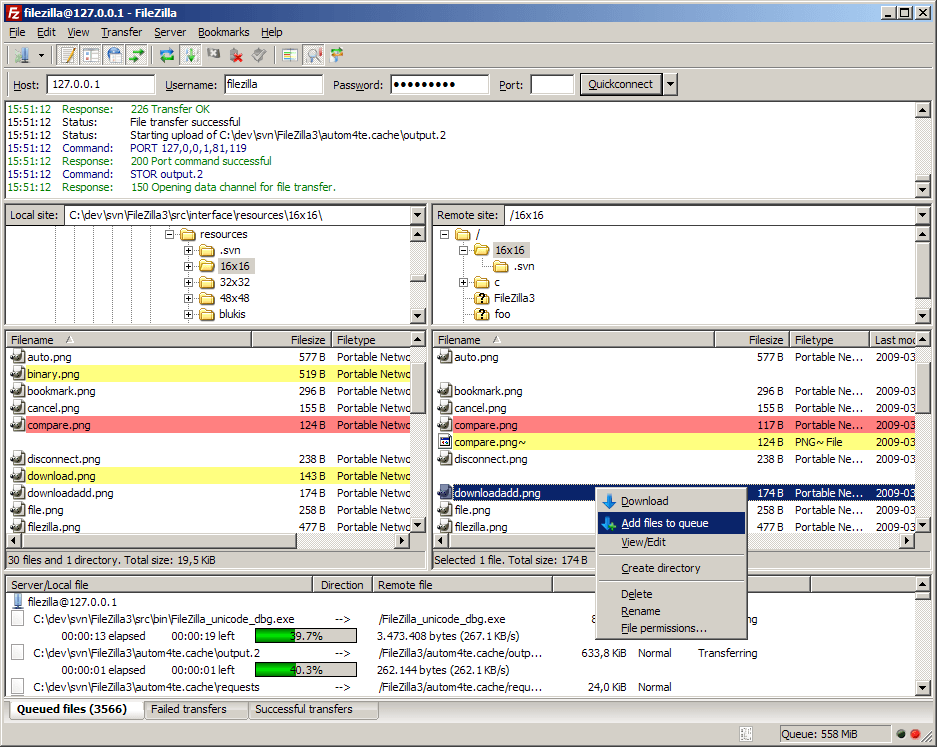
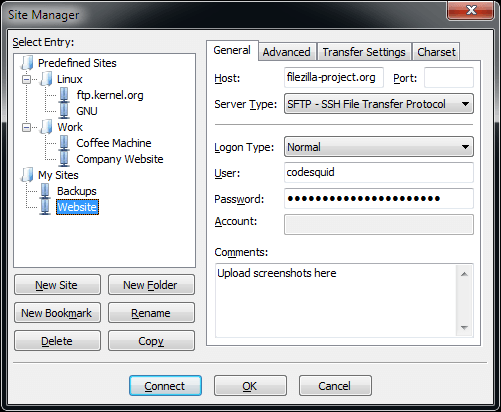
Description:FileZilla is a powerful Open Source FTP/SFTP client with many features. It includes a site manager to store all your connection details and logins as well as an Explorer style interface that shows the local and remote folders and can be customized independently. The program offers support for firewalls and proxy connections as well as SSL and Kerberos GSS security. Additional features include keep alive, auto ascii/binary transfer, download queue, manual transfers, raw FTP commands and more. A nice program for beginners and advanced user alike.
Whats's New:Fixed vulnerabilities: - Merge further fixes from PuTTY to address CVE-2013-4206, CVE-2013-4207, CVE-2013-4208
Screenshots:
Download: (5MB)Link | HomepageLink | ChangelogDownload | 3.7.3Download | Portable
Description:HWiNFO32 and HWiNFO64 are professional hardware information and diagnostic tools supporting latest components, industry technologies and standards. These tools are designed to collect and present the maximum amount of information possible about computer's hardware which makes them suitable for users searching for driver updates, computer manufacturers, system integrators and technical experts as well. Retrieved information is presented in a logical and easily understandable form and can be exported into various types of reports. Features:- In-depth Hardware Information
- From a quick overview unfolding into the depth of all hardware components. Always up-to date supporting latest technologies and standards.
- Real-Time System Monitoring
- Accurate monitoring of all system components for actual status and failure prediction. Customizable interface with variety of options.
- Extensive Reporting
- Multiple types of reports, status logging and interfacing with other tools or add-ons.
What's New:Updated Auto Start option to use TaskScheduler on Windows Vista and later (avoids UAC prompt).Added AMD FirePro S9000 and S10000.Enhanced sensor monitoring on ASUS Z9PE.Enhanced sensor monitoring on Gigabyte H87, B85 and G1.Sniper B5 series.Enhanced reporting of CPU features in summary window.Added reporting of GPU clock on Intel Cedarview.Added reporting of new CPU features: AVX-512, ADX, SMAP, IPT, SHA.Improved tracking of values in sensor graphs.Added new nVidia GPU models: GeForce GT 710M,755M, Quadro K510M,K2100M,K4100M, GRID K100 and GRID K200.Added support of Intel Broadwell family.Added AMD Volcanic Islands/Crystal: Maui, Iceland/Topaz, Tonga/Amethyst.Added AMD Pirate Islands: Bermuda, Fiji, Treasure.Added AMD Carrizo, Amur, Bhavani.
Required O/S:WIN XP, VISTA, 7 AND 8
Screenshots:
Download: (3MB)Link | HomepageLink | ChangelogDownload | HWiNFO32Download | HWiNFO64Download | HWiNFO32 PortableDownload | HWiNFO64 Portable
Description:This utility, which has the most comprehensive knowledge of auto-starting locations of any startup monitor, shows you what programs are configured to run during system bootup or login, and shows you the entries in the order Windows processes them. These programs include ones in your startup folder, Run, RunOnce, and other Registry keys. You can configure Autoruns to show other locations, including Explorer shell extensions, toolbars, browser helper objects, Winlogon notifications, auto-start services, and much more. Autoruns goes way beyond the MSConfig utility bundled with Windows Me and XP.Autoruns' Hide Signed Microsoft Entries option helps you to zoom in on third-party auto-starting images that have been added to your system and it has support for looking at the auto-starting images configured for other accounts configured on a system. Also included in the download package is a command-line equivalent that can output in CSV format, Autorunsc.You'll probably be surprised at how many executables are launched automatically!
Autorunsc Usage:Autorunsc is the command-line version of Autoruns. Its usage syntax is:Usage: autorunsc [-x] [[-a] | [-b] [-c] [-d] [-e] [-g] [-h] [-i] [-k] [-l] [-m] [-o] [-p] [-r] [-s] [-v] [-w] [[-z <systemroot> <userprofile>] | [user]]]-a Show all entries.-b Boot execute.-c Print output as CSV.-d Appinit DLLs.-e Explorer addons.-g Sidebar gadgets (Vista and higher).-h Image hijacks.-i Internet Explorer addons.-l Logon startups (this is the default).-m Hide signed Microsoft entries.-n Winsock protocol and network providers.-p Printer monitor drivers.-r LSA providers.-s Autostart services and non-disabled drivers.-t Scheduled tasks.-v Verify digital signatures.-w Winlogon entries.-x Print output as XML.-z Specifies the offline Windows system to scan.user Specifies the name of the user account for which autorun items will be shown.
What's New:- adds a new option to have it show only per-user locations, something that is useful when analyzing the autostarts of different accounts than the one that Autoruns is running under.
Required O/S:WIN XP, VISTA, 7 AND 8
Screenshots:
Download: (538KB)Link | HomepageDownload | v11.70
Description:The Sysinternals Troubleshooting Utilities have been rolled up into a single Suite of tools. This file contains the individual troubleshooting tools and help files. It does not contain non-troubleshooting tools like the BSOD Screen Saver or NotMyFault. The Sysinternals Suite is a bundle of several Sysinternals Utilies like AccessChk, Autologon, Ctrl2Cap, DiskView, Disk Usage (DU), LogonSessions, PageDefrag, ProcessExplorer, PsLogList, PsPasswd, RegMon, RootkitRevealer, TCPView, VMMap, ZoomIt.
What's New: - Autoruns V11.70This release of Autoruns, a powerful utility for scanning and disabling autostart code, adds a new option to have it show only per-user locations, something that is useful when analyzing the autostarts of different accounts than the one that Autoruns is running under. - Process Explorer v15.40Process Explorer, a Task Manager replacement, now shows WMI providers hosted in Wmiprvse processes (thanks to Mohamed Elghetany for contributions); includes an option that configures it to automatically run when you logon; and introduces a process view column that shows process DPI awareness support on Windows 8.1 systems.
Required O/S:WIN XP, VISTA, 7 AND 8
Screenshots:
Download: (12.5MB)Link | HomepageLink | ChangelogDownload | 2013-07-01